Connect Code
You can connect code repositories from GitHub and GitLab.com to RenkuLab, too!
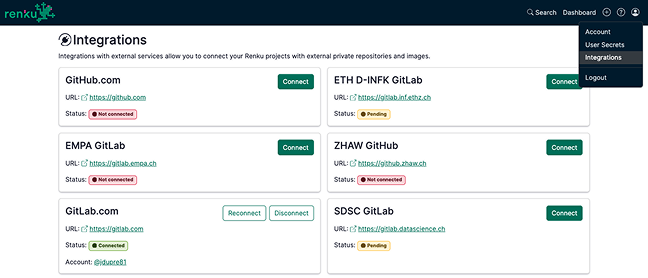
Check out the Integrations page (accessible via the 👤 user menu in the top right) to connect your accounts and sync access to repositories. For more information, see How to connect your Renku account to your GitHub or GitLab account. And, if your institution has a dedicated GitLab instance you would like to integrate with Renku, do not hesitate to Contact us, and we will be happy to add it to RenkuLab’s Integrations!
For this project, we've created a code repository for this project on GitLab. We need to connect this git repository to the Renku project in order to access it.
Here's how to add the code repository to your project:
-
Click on + under the Code Repositories section.
-
Copy and paste the link to Clone with HTTPS from your git project. In this case, we already provide you with the code here:
https://gitlab.com/renku/air-quality-analysis
For more information about working with code repositories on Renku, check out the code section in the How To Guides.