Resource Pools & Classes
The compute resource available to Renku users are determined by the resources pools the user has access to. To specify the resources for a project’s launcher, you select a resource class from any of the resource pools available to you. The same resource pools and classes apply to interactive Sessions and background Jobs.
Resource Pools
A resource pool is a total resource quota, a set of users who are allowed to use resources from that quota, and culling times for sessions using those resources.
- Resources: For example, a resource pool may be configured for 160 CPUs, 1024 GB RAM, and 16 GPUs.
- Users: There is no limit to how many users can be added to a resource pool. And conversely, a user may be granted access to any number of resource pools. All resource pools the user has access to show up in their resource selector when they configure their RenkuLab session.
- Culling times: You can customize the max idle time for your resource pool(s). For example, in the Public resource pool (the default resource pool available to all RenkuLab users), sessions auto-pause after 2 hours of idle time, and shut down after 2 weeks. You may customize these thresholds to be longer or shorter. Jobs are not paused for idle time in the same way as sessions, but completed and errored jobs are removed from the interface after a retention period (see Job).
Resource Classes
A resource pool contains a set of resource classes. A resource class is a resource configuration that a user can select for their RenkuLab session.
For example, a resource class may be:
- 12 CPUs, 80 GB RAM, 2 GPUs, 50 GB default disk, 500 GB max disk
As users run sessions and jobs, their compute resources (the resource class in use) come out of the quota on the resource pool. If the resource pool’s quota has been reached, users won’t be able to start more sessions or jobs in that resource pool (but they may use other resource pools they have access to).
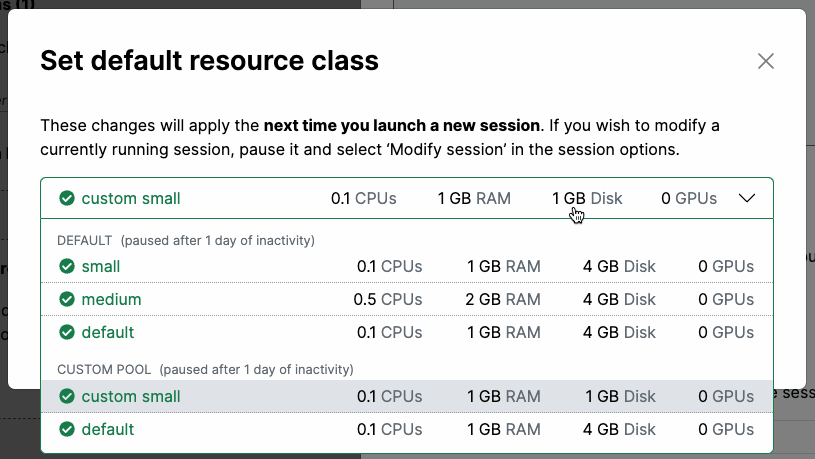 For custom resource pools granted to users, you may customize the resource classes in you resource pool.
The Public Resource Pool & Classes
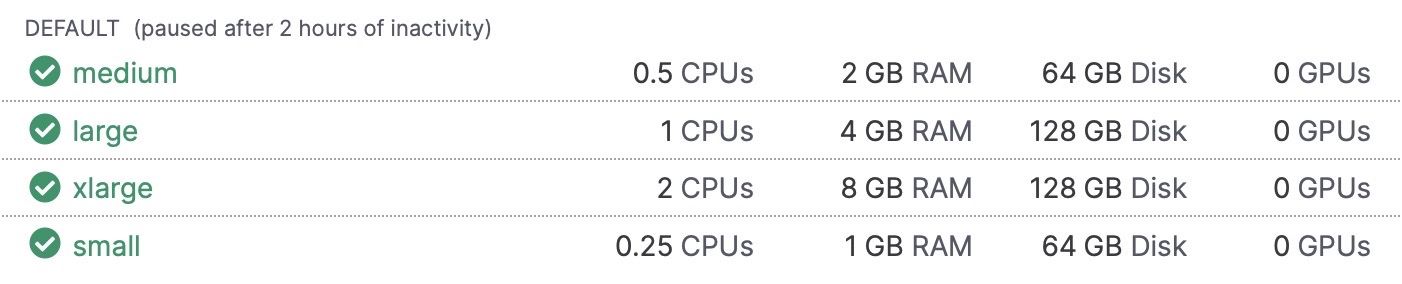
On RenkuLab, the following resources classes are publicly available (in the “public resource pool”):
Request a Custom Resource Pool
Do you need more resources than are available in RenkuLab’s public resource classes? Contact us! We can configure a custom resource pool for your needs upon demand. We apply flat, transparent pricing, passing down infra rates savings.