Configure front ends for a session environment
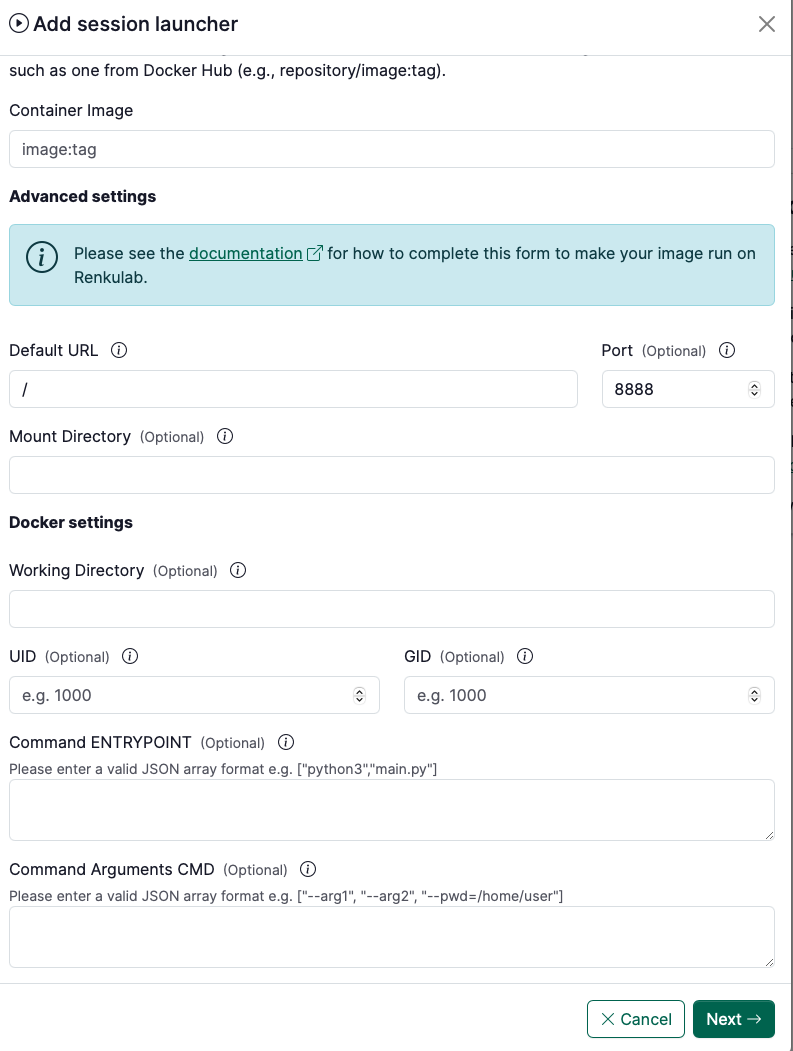
In order to run a docker image in a session, Renku needs to know some information about how to run and serve that image.
In this section, you can see example configurations for commonly used images. If you build an image with one of these images as the base, then you can use this provided configuration to make that image run in RenkuLab. The information below can be copied and pasted into the Advanced Settings form for creating a custom environment.
Jupyter
- Container Image:
jupyter/minimal-notebook:python-3.11 - Port:
8888 - Default URL:
/lab - Command ENTRYPOINT:
["sh", "-c"]
- Command Arguments CMD (learn more):
[
  "jupyter server --ServerApp.ip=0.0.0.0 --ServerApp.port=8888 --ServerApp.base_url=$RENKU_BASE_URL_PATH --ServerApp.token=\"\" --ServerApp.password=\"\" --ServerApp.allow_remote_access=true --ContentsManager.allow_hidden=true --ServerApp.allow_origin=*"
]
Julia and Jupyter
- Container Image:
jupyter/julia-notebook:x86_64-python-3.11.6 - Port:
8888 - Default URL:
/lab - Working Directory:
/home/jovyan/work - Mount Directory:
/home/jovyan/work - Command ENTRYPOINT:
["sh", "-c"]
- Command Arguments CMD (learn more):
[
  "jupyter server --ServerApp.ip=0.0.0.0 --ServerApp.port=8888 --ServerApp.base_url=$RENKU_BASE_URL_PATH --ServerApp.token=\"\" --ServerApp.password=\"\" --ServerApp.allow_remote_access=true --ContentsManager.allow_hidden=true --ServerApp.allow_origin=*"
]
Rstudio
🚧 Not yet available
RShiny
🚧 Not yet available
VSCode
- Container Image: Build a docker image that includes vscode in the PATH
- Port:
8888 - Command ENTRYPOINT:
["sh", "-c"]
- Command Arguments CMD (learn more):
[
  "code serve-web --server-base-path $RENKU_BASE_URL_PATH/ --without-connection-token --host 0.0.0.0 --port 8888"
]
Streamlit
- Container Image: Build a docker image that includes streamlit and any other requirements needed by your streamlit app
- Port:
8888 - Command ENTRYPOINT:
["sh", "-c"]
- Command Arguments CMD (fill in
<your-repo-name>/<your-app>) (learn more):
[
  "streamlit run $RENKU_WORKING_DIR/<your-repo-name>/<your-app>.py --server.port=8888 --server.address=0.0.0.0 --server.baseUrlPath=$RENKU_BASE_URL_PATH"
]
Plotly Dash
- Container Image: Build a docker image that includes plotly and any other requirements needed by your plotly app
- Port:
8888 - Command ENTRYPOINT:
["sh", "-c"]
- Command Arguments CMD (fill in
<your-repo-name>/<your-app>!) (learn more):
[
  "DASH_URL_BASE_PATHNAME=$RENKU_BASE_URL_PATH/ HOST=0.0.0.0 PORT=8888 python $RENKU_WORKING_DIR/<your-repo-name>/<your-app>.py"
]
Gradio
- Container Image: Build a docker image that includes Gradio and any other requirements needed by your Gradio app
- Port:
8888 - Command ENTRYPOINT:
["sh", "-c"]
- Command Arguments CMD (fill in
<your-repo-name>/<your-app>!)(learn more):
[
  "python $RENKU_WORKING_DIR/<your-repo-name>/<your-app>.py --server_port=8888 --server_name=0.0.0.0 --root_path=$RENKU_BASE_URL_PATH"
]
Note that these command line arguments need to be defined in your Gradio app file. This can be done easily with Python’s argparse library, for example. Just paste the following lines into your Gradio file:
from argparse import ArgumentParser

parser = ArgumentParser()
parser.add_argument('--server_port', default=8888, type=int)
parser.add_argument('--server_name', default=None, type=str)
parser.add_argument('--root_path', default=None, type=str)

args = parser.parse_args()
and then make sure to launch your app with the arguments that were set:
with gr.Blocks() as app: # or app = gr.Interface(...)
		# Gradio blocks
		...

app.launch(server_port=args.server_port,
					 server_name=args.server_name,
					 root_path=args.root_path)